一、安装步骤
安装Homebrew –> 安装rvm –> 安装ruby -> 安装cocoapods
二、检查Homebrew或安装
1、查看安装的版本信息
1
2
3
4
5
|
brew --version

Homebrew 4.0.4-202-gb1ef41c
Homebrew/homebrew-core (git revision fd2e83a24e8; last commit 2023-03-06)
Homebrew/homebrew-cask (git revision c896fe8640; last commit 2023-03-06)
|
2、安装Homebrew
方式1:官方提供的安装方法
1
|
/bin/bash -c "$(curl -fsSL https://raw.githubusercontent.com/Homebrew/install/master/install.sh)"
|
方式2:使用国内的源进行安装
1
|
/bin/zsh -c "$(curl -fsSL https://gitee.com/cunkai/HomebrewCN/raw/master/Homebrew.sh)"
|
安装完成后执行
1
|
source /Users/apple/.rvm/scripts/rvm
|
三、检查rvm
1、检查rvm是否安装
1
2
3
|
rvm -v

rvm 1.29.12 (latest) by Michal Papis, Piotr Kuczynski, Wayne E. Seguin [https://rvm.io]
|
2、更新rvm
若执行失败,可以在命令前加入sudo权限
3、安装rvm
1
2
3
|
 curl -L https://get.rvm.io | bash -s stable

source ~/.rvm/scripts/rvm
|
四、检查ruby或安装
1、检查ruby是否安装
1
2
3
|
ruby -v

ruby 2.7.2p137 (2020-10-01 revision 5445e04352) [x86_64-darwin21]
|
2、查看ruby在系统中可安装的版本
 1
 2
 3
 4
 5
 6
 7
 8
 9
10
11
12
13
14
15
16
17
|
# MRI Rubies
[ruby-]1.8.6[-p420]
[ruby-]1.8.7[-head] # security released on head
[ruby-]1.9.1[-p431]
[ruby-]1.9.2[-p330]
[ruby-]1.9.3[-p551]
[ruby-]2.0.0[-p648]
[ruby-]2.1[.10]
[ruby-]2.2[.10]
[ruby-]2.3[.8]
[ruby-]2.4[.10]
[ruby-]2.5[.8]
[ruby-]2.6[.6]
[ruby-]2.7[.2]
[ruby-]3[.0.0]
ruby-head
......
|
3、安装最新版本ruby
1
2
3
|
rvm install 3.0.0

ruby 3.0.0p0 (2020-12-25 revision 95aff21468) [arm64-darwin22]
|
4、安装ruby遇到的错
(1)执行 brew install ruby 时报错
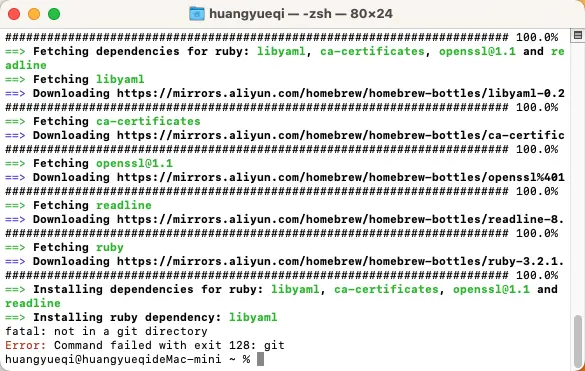
解决方法:
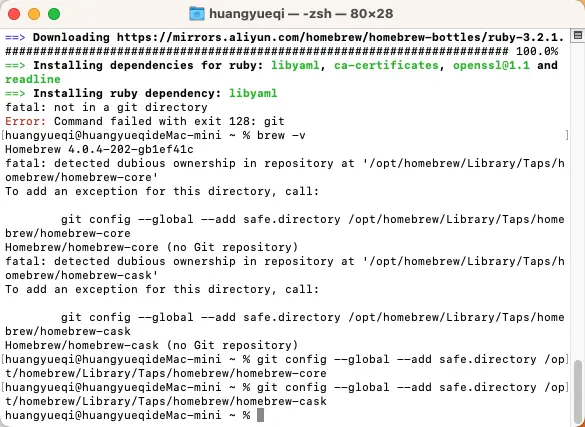
输入brew -v后会提示你执行两个配置命令,直接复制执行就ok了!
1
2
|
git config --global --add safe.directory /opt/homebrew/Library/Taps/homebrew/homebrew-core
git config --global --add safe.directory /opt/homebrew/Library/Taps/homebrew/homebrew-cask
|
具体如下图所示:
(2)执行 rvm install 3.0.0 时报错
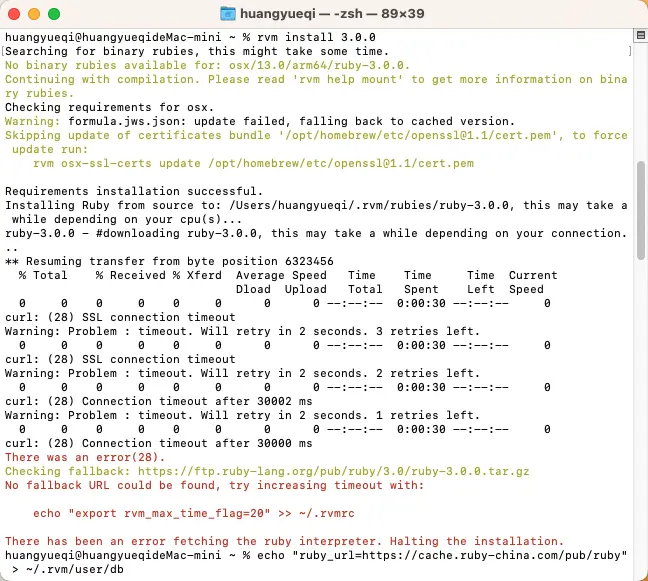
解决方法:
1
|
echo "ruby_url=https://cache.ruby-china.com/pub/ruby" > ~/.rvm/user/db
|
5、将ruby该版本设置默认使用
6、查询Ruby的源地址
替换国内Ruby镜像源
1
2
3
|
 gem sources --remove https://rubygems.org/

gem sources --add https://gems.ruby-china.com/
|
五、安装cocoapods
1
|
sudo gem install -n /usr/local/bin cocoapods
|
问题:执行上面命令后还是找不到pod
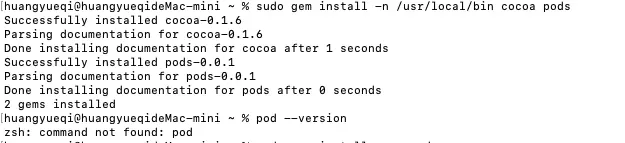
解决方法:
执行 sudo gem install Cocoapods 重新安装
六、pod install报错
1、执行“sudo xcode-select –switch /Applications/Xcode.app/Contents/Developer/”切换到当前Xcode路径下
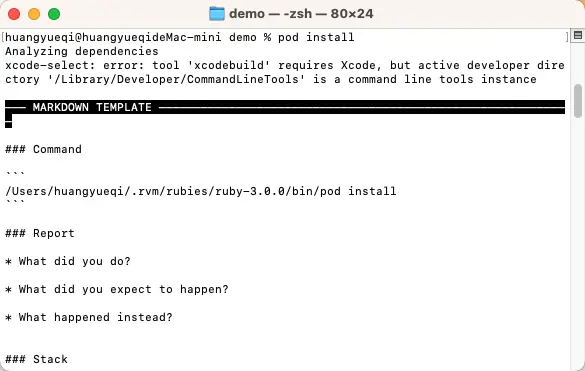
2、
1
2
3
4
5
|
Cloning spec repo `cocoapods` from `https://github.com/CocoaPods/Specs.git`

# 过了很久很久没反应
[!] Unable to add a source with url `https://github.com/CocoaPods/Specs.git` named `cocoapods`.
You can try adding it manually in `/Users/xxx/.cocoapods/repos` or via `pod repo add`.
|
解决方法:
检查一下 master 文件夹是否存在,如果存在 master 文件夹,执行 pod repo remove master。不存在则跳过这一条命令。
接下来继续执行以下命令