本文记录一个最简单的基于FFmpeg的推流器(simplest ffmpeg streamer)。推流器的作用就是将本地的视频数据推送至流媒体服务器。本文记录的推流器,可以将本地的 MOV / AVI / MKV / MP4 / FLV 等格式的媒体文件,通过流媒体协议(例如RTMP,HTTP,UDP,TCP,RTP等等)以直播流的形式推送出去。由于流媒体协议种类繁多,不一一记录。在这里记录将本地文件以RTMP直播流的形式推送至RTMP流媒体服务器(例如 Flash Media Server,Red5,Wowza等等)的方法。
在这个推流器的基础上可以进行多种方式的修改,实现各式各样的推流器。例如:
将输入文件改为网络流URL,可以实现转流器。
将输入的文件改为回调函数(内存读取)的形式,可以推送内存中的视频数据。
将输入文件改为系统设备(通过libavdevice),同时加上编码的功能,可以实现实时推流器(现场直播)。
PS:本程序并不包含视频转码的功能。
简介
RTMP推流器(Streamer)的在流媒体系统中的作用可以用下图表示。首先将视频数据以RTMP的形式发送到流媒体服务器端(Server,比如FMS,Red5,Wowza等),然后客户端(一般为Flash Player)通过访问流媒体服务器就可以收看实时流了。
运行本程序之前需要先运行RTMP流媒体服务器,并在流媒体服务器上建立相应的Application。有关流媒体服务器的操作不在本文的论述范围内,在此不再详述。本程序运行后,即可通过RTMP客户端(例如 Flash Player, FFplay等等)收看推送的直播流。
需要要注意的地方
封装格式
RTMP采用的封装格式是FLV。因此在指定输出流媒体的时候需要指定其封装格式为“flv”。同理,其他流媒体协议也需要指定其封装格式。例如采用UDP推送流媒体的时候,可以指定其封装格式为“mpegts”。
延时
发送流媒体的数据的时候需要延时。不然的话,FFmpeg处理数据速度很快,瞬间就能把所有的数据发送出去,流媒体服务器是接受不了的。因此需要按照视频实际的帧率发送数据。本文记录的推流器在视频帧与帧之间采用了av_usleep()函数休眠的方式来延迟发送。这样就可以按照视频的帧率发送数据了,参考代码如下。
 1
 2
 3
 4
 5
 6
 7
 8
 9
10
11
12
13
14
int64_t start_time = av_gettime ();
while ( 1 ) {
Important : Delay
if ( pkt . stream_index == videoindex ){
AVRational time_base = ifmt_ctx -> streams [ videoindex ] -> time_base ;
AVRational time_base_q = { 1 , AV_TIME_BASE };
int64_t pts_time = av_rescale_q ( pkt . dts , time_base , time_base_q );
int64_t now_time = av_gettime () - start_time ;
if ( pts_time > now_time )
av_usleep ( pts_time - now_time );
}
}
i
PTS/DTS问题
没有封装格式的裸流(例如H.264裸流)是不包含PTS、DTS这些参数的。在发送这种数据的时候,需要自己计算并写入AVPacket的PTS,DTS,duration等参数。这里还没有深入研究,简单写了一点代码,如下所示。
 1
 2
 3
 4
 5
 6
 7
 8
 9
10
11
12
//FIX:No PTS (Example: Raw H.264)
//Simple Write PTS
if ( pkt . pts == AV_NOPTS_VALUE ){
//Write PTS
AVRational time_base1 = ifmt_ctx -> streams [ videoindex ] -> time_base ;
Duration between 2 frames ( us )
int64_t calc_duration = ( double ) AV_TIME_BASE / av_q2d ( ifmt_ctx -> streams [ videoindex ] -> r_frame_rate );
//Parameters
pkt . pts = ( double )( frame_index * calc_duration ) / ( double )( av_q2d ( time_base1 ) * AV_TIME_BASE );
pkt . dts = pkt . pts ;
pkt . duration = ( double ) calc_duration / ( double )( av_q2d ( time_base1 ) * AV_TIME_BASE );
}
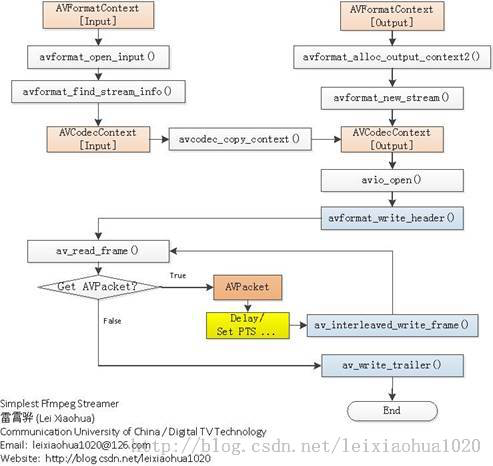
程序流程图
程序的流程图如下图所示。可以看出和《最简单的基于FFMPEG的封装格式转换器(无编解码)》中的封装格式转换器比较类似。它们之间比较明显的区别在于:
Streamer输出为URL
Streamer包含了延时部分
代码
代码如下。
  1
  2
  3
  4
  5
  6
  7
  8
  9
 10
 11
 12
 13
 14
 15
 16
 17
 18
 19
 20
 21
 22
 23
 24
 25
 26
 27
 28
 29
 30
 31
 32
 33
 34
 35
 36
 37
 38
 39
 40
 41
 42
 43
 44
 45
 46
 47
 48
 49
 50
 51
 52
 53
 54
 55
 56
 57
 58
 59
 60
 61
 62
 63
 64
 65
 66
 67
 68
 69
 70
 71
 72
 73
 74
 75
 76
 77
 78
 79
 80
 81
 82
 83
 84
 85
 86
 87
 88
 89
 90
 91
 92
 93
 94
 95
 96
 97
 98
 99
100
101
102
103
104
105
106
107
108
109
110
111
112
113
114
115
116
117
118
119
120
121
122
123
124
125
126
127
128
129
130
131
132
133
134
135
136
137
138
139
140
141
142
143
144
145
146
147
148
149
150
151
152
153
154
155
156
157
158
159
160
161
162
163
164
165
166
167
168
169
170
171
172
173
174
175
176
177
178
179
180
181
182
183
184
185
186
187
188
189
190
191
192
193
194
195
196
197
198
199
200
201
202
203
204
205
206
/**
* 最简单的基于FFmpeg的推流器(推送RTMP)
* Simplest FFmpeg Streamer (Send RTMP)
*
*
* 本例子实现了推送本地视频至流媒体服务器(以RTMP为例)。
* 是使用FFmpeg进行流媒体推送最简单的教程。
*
* This example stream local media files to streaming media
* server (Use RTMP as example).
* It's the simplest FFmpeg streamer.
*
*/
#include <stdio.h>
#define __STDC_CONSTANT_MACROS
#ifdef _WIN32
Windows
extern "C"
{
#include "libavformat/avformat.h"
#include "libavutil/mathematics.h"
#include "libavutil/time.h"
};
#else
Linux ...
#ifdef __cplusplus
extern "C"
{
#endif
#include <libavformat/avformat.h>
#include <libavutil/mathematics.h>
#include <libavutil/time.h>
#ifdef __cplusplus
};
#endif
#endif
int main ( int argc , char * argv [])
{
AVOutputFormat * ofmt = NULL ;
//输入对应一个AVFormatContext,输出对应一个AVFormatContext
( Input AVFormatContext and Output AVFormatContext )
AVFormatContext * ifmt_ctx = NULL , * ofmt_ctx = NULL ;
AVPacket pkt ;
const char * in_filename , * out_filename ;
int ret , i ;
int videoindex =- 1 ;
int frame_index = 0 ;
int64_t start_time = 0 ;
in_filename = "cuc_ieschool.mov" ;
in_filename = "cuc_ieschool.mkv" ;
in_filename = "cuc_ieschool.ts" ;
in_filename = "cuc_ieschool.mp4" ;
in_filename = "cuc_ieschool.h264" ;
in_filename = "cuc_ieschool.flv" ; //输入URL(Input file URL)
in_filename = "shanghai03_p.h264" ;
out_filename = "rtmp://localhost/publishlive/livestream" ; 输出 URL ( Output URL ) [ RTMP ]
out_filename = "rtp://233.233.233.233:6666" ; 输出 URL ( Output URL ) [ UDP ]
av_register_all ();
//Network
avformat_network_init ();
//输入(Input)
if (( ret = avformat_open_input ( & ifmt_ctx , in_filename , 0 , 0 )) < 0 ) {
printf ( "Could not open input file." );
goto end ;
}
if (( ret = avformat_find_stream_info ( ifmt_ctx , 0 )) < 0 ) {
printf ( "Failed to retrieve input stream information" );
goto end ;
}
for ( i = 0 ; i < ifmt_ctx -> nb_streams ; i ++ )
if ( ifmt_ctx -> streams [ i ] -> codec -> codec_type == AVMEDIA_TYPE_VIDEO ){
videoindex = i ;
break ;
}
av_dump_format ( ifmt_ctx , 0 , in_filename , 0 );
//输出(Output)
avformat_alloc_output_context2 ( & ofmt_ctx , NULL , "flv" , out_filename ); RTMP
avformat_alloc_output_context2 ( & ofmt_ctx , NULL , "mpegts" , out_filename ); UDP
if ( ! ofmt_ctx ) {
printf ( "Could not create output context \n " );
ret = AVERROR_UNKNOWN ;
goto end ;
}
ofmt = ofmt_ctx -> oformat ;
for ( i = 0 ; i < ifmt_ctx -> nb_streams ; i ++ ) {
//根据输入流创建输出流(Create output AVStream according to input AVStream)
AVStream * in_stream = ifmt_ctx -> streams [ i ];
AVStream * out_stream = avformat_new_stream ( ofmt_ctx , in_stream -> codec -> codec );
if ( ! out_stream ) {
printf ( "Failed allocating output stream \n " );
ret = AVERROR_UNKNOWN ;
goto end ;
}
//复制AVCodecContext的设置(Copy the settings of AVCodecContext)
ret = avcodec_copy_context ( out_stream -> codec , in_stream -> codec );
if ( ret < 0 ) {
printf ( "Failed to copy context from input to output stream codec context \n " );
goto end ;
}
out_stream -> codec -> codec_tag = 0 ;
if ( ofmt_ctx -> oformat -> flags & AVFMT_GLOBALHEADER )
out_stream -> codec -> flags |= CODEC_FLAG_GLOBAL_HEADER ;
}
//Dump Format
av_dump_format ( ofmt_ctx , 0 , out_filename , 1 );
//打开输出URL(Open output URL)
if ( ! ( ofmt -> flags & AVFMT_NOFILE )) {
ret = avio_open ( & ofmt_ctx -> pb , out_filename , AVIO_FLAG_WRITE );
if ( ret < 0 ) {
printf ( "Could not open output URL '%s'" , out_filename );
goto end ;
}
}
//写文件头(Write file header)
ret = avformat_write_header ( ofmt_ctx , NULL );
if ( ret < 0 ) {
printf ( "Error occurred when opening output URL \n " );
goto end ;
}
start_time = av_gettime ();
while ( 1 ) {
AVStream * in_stream , * out_stream ;
//获取一个AVPacket(Get an AVPacket)
ret = av_read_frame ( ifmt_ctx , & pkt );
if ( ret < 0 )
break ;
//FIX:No PTS (Example: Raw H.264)
//Simple Write PTS
if ( pkt . pts == AV_NOPTS_VALUE ){
//Write PTS
AVRational time_base1 = ifmt_ctx -> streams [ videoindex ] -> time_base ;
Duration between 2 frames ( us )
int64_t calc_duration = ( double ) AV_TIME_BASE / av_q2d ( ifmt_ctx -> streams [ videoindex ] -> r_frame_rate );
//Parameters
pkt . pts = ( double )( frame_index * calc_duration ) / ( double )( av_q2d ( time_base1 ) * AV_TIME_BASE );
pkt . dts = pkt . pts ;
pkt . duration = ( double ) calc_duration / ( double )( av_q2d ( time_base1 ) * AV_TIME_BASE );
}
//Important:Delay
if ( pkt . stream_index == videoindex ){
AVRational time_base = ifmt_ctx -> streams [ videoindex ] -> time_base ;
AVRational time_base_q = { 1 , AV_TIME_BASE };
int64_t pts_time = av_rescale_q ( pkt . dts , time_base , time_base_q );
int64_t now_time = av_gettime () - start_time ;
if ( pts_time > now_time )
av_usleep ( pts_time - now_time );
}
in_stream = ifmt_ctx -> streams [ pkt . stream_index ];
out_stream = ofmt_ctx -> streams [ pkt . stream_index ];
/* copy packet */
//转换PTS/DTS(Convert PTS/DTS)
pkt . pts = av_rescale_q_rnd ( pkt . pts , in_stream -> time_base , out_stream -> time_base , ( AVRounding )( AV_ROUND_NEAR_INF | AV_ROUND_PASS_MINMAX ));
pkt . dts = av_rescale_q_rnd ( pkt . dts , in_stream -> time_base , out_stream -> time_base , ( AVRounding )( AV_ROUND_NEAR_INF | AV_ROUND_PASS_MINMAX ));
pkt . duration = av_rescale_q ( pkt . duration , in_stream -> time_base , out_stream -> time_base );
pkt . pos = - 1 ;
Print to Screen
if ( pkt . stream_index == videoindex ){
printf ( "Send %8d video frames to output URL \n " , frame_index );
frame_index ++ ;
}
ret = av_write_frame ( ofmt_ctx , & pkt );
ret = av_interleaved_write_frame ( ofmt_ctx , & pkt );
if ( ret < 0 ) {
printf ( "Error muxing packet \n " );
break ;
}
av_free_packet ( & pkt );
}
//写文件尾(Write file trailer)
av_write_trailer ( ofmt_ctx );
end :
avformat_close_input ( & ifmt_ctx );
/* close output */
if ( ofmt_ctx && ! ( ofmt -> flags & AVFMT_NOFILE ))
avio_close ( ofmt_ctx -> pb );
avformat_free_context ( ofmt_ctx );
if ( ret < 0 && ret != AVERROR_EOF ) {
printf ( "Error occurred. \n " );
return - 1 ;
}
return 0 ;
}
结果
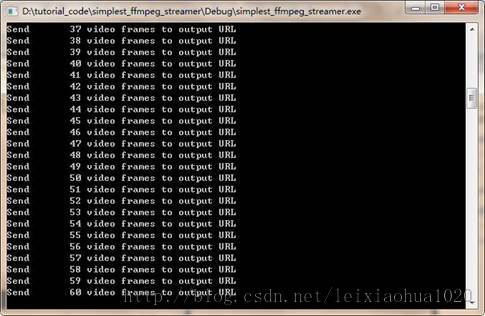
程序开始运行后。截图如下所示。
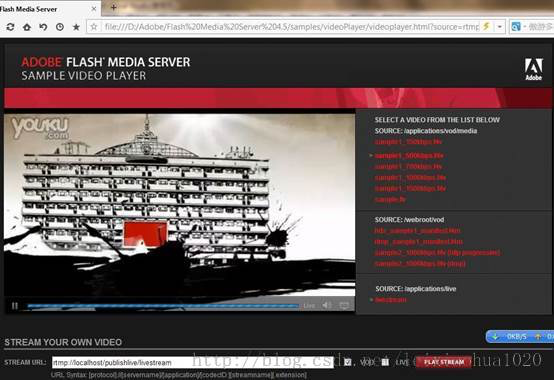
可以通过网页播放器播放推送的直播流。
例如下图所示,使用Flash Media Server 的Samples文件夹下的videoPlayer播放直播流的截图如下图所示。(直播地址:rtmp://localhost/publishlive/livestream)
此外,也可以通过FFplay这样的客户端播放直播流。
下载
simplest ffmpeg streamer
项目主页
SourceForge:https://sourceforge.net/projects/simplestffmpegstreamer/
Github:https://github.com/leixiaohua1020/simplest_ffmpeg_streamer
开源中国:http://git.oschina.net/leixiaohua1020/simplest_ffmpeg_streamer
CSDN下载地址:
http://download.csdn.net/detail/leixiaohua1020/8005311
更新-1.1
这次考虑到了跨平台的要求,调整了源代码。经过这次调整之后,源代码可以在以下平台编译通过:
VC++:打开sln文件即可编译,无需配置。
cl.exe:打开compile_cl.bat即可命令行下使用cl.exe进行编译,注意可能需要按照VC的安装路径调整脚本里面的参数。编译命令如下。
1
2
3
4
5
6
7
8
9
:: VS2010 Environment
call "D:\Program Files\Microsoft Visual Studio 10.0\VC \v cvarsall.bat"
:: include
@ set INCLUDE = include ; % INCLUDE % ;
:: lib
@ set LIB = lib ; % LIB % ;
:: compile and link
cl simplest_ffmpeg_streamer . cpp / link avcodec . lib avformat . lib avutil . lib ^
avdevice . lib avfilter . lib postproc . lib swresample . lib swscale . lib / OPT : NOREF
MinGW:MinGW命令行下运行compile_mingw.sh即可使用MinGW的g++进行编译。编译命令如下。
1
2
g ++ simplest_ffmpeg_streamer . cpp - g - o simplest_ffmpeg_streamer . exe \
- I / usr / local / include - L / usr / local / lib - lavformat - lavcodec - lavutil
GCC:Linux或者MacOS命令行下运行compile_gcc.sh即可使用GCC进行编译。编译命令如下。
1
2
cc simplest_ffmpeg_streamer . cpp - g - o simplest_ffmpeg_streamer . out \
- I / usr / local / include - L / usr / local / lib - lavformat - lavcodec - lavutil
PS:相关的编译命令已经保存到了工程文件夹中
CSDN下载地址:http://download.csdn.net/detail/leixiaohua1020/8445455
SourceForge上已经更新。
更新-1.2
增加了下列工程:
simplest_ffmpeg_receiver: 将流媒体数据保存成本地文件。
CSDN项目下载地址:http://download.csdn.net/detail/leixiaohua1020/8924345
SourceForge、Github等上面已经更新。